
MailerLite cut its free plan from 1,000 subscribers to 500 in September 2025. Existing accounts over the limit were locked out immediately — no campaigns, no automations, no manual sends. That single change pushed a lot of creators to reevaluate whether MailerLite was still the obvious budget pick, and whether ConvertKit was worth the premium after all.
The two platforms overlap significantly — email automation, landing pages, forms, segmentation — but they’ve invested in different directions. MailerLite has leaned into interface quality and pricing. ConvertKit has built a commerce layer and a creator ecosystem around the list.
Quick answer: MailerLite still wins on value for pure newsletter building — $15/mo vs $39/mo at 1,000 subscribers. ConvertKit earns its price premium only if you’re actively selling digital products through its native Commerce layer or using its Creator Network for growth.
Quick Comparison
| MailerLite | ConvertKit | |
|---|---|---|
| Free tier | 500 subscribers, 12k emails/mo | 10,000 subscribers (limited automations) |
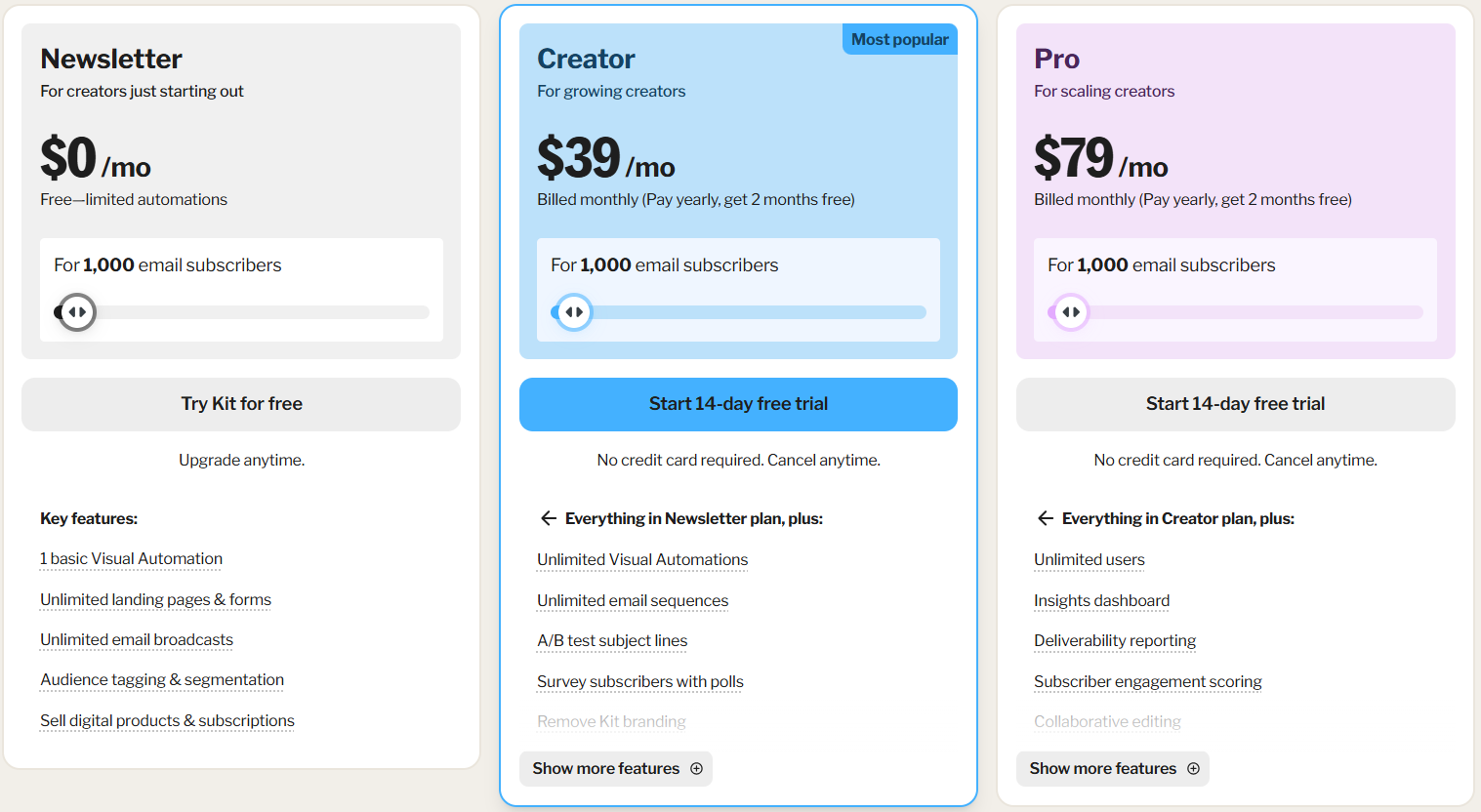
| Paid (1k subs) | $15/month | $39/month |
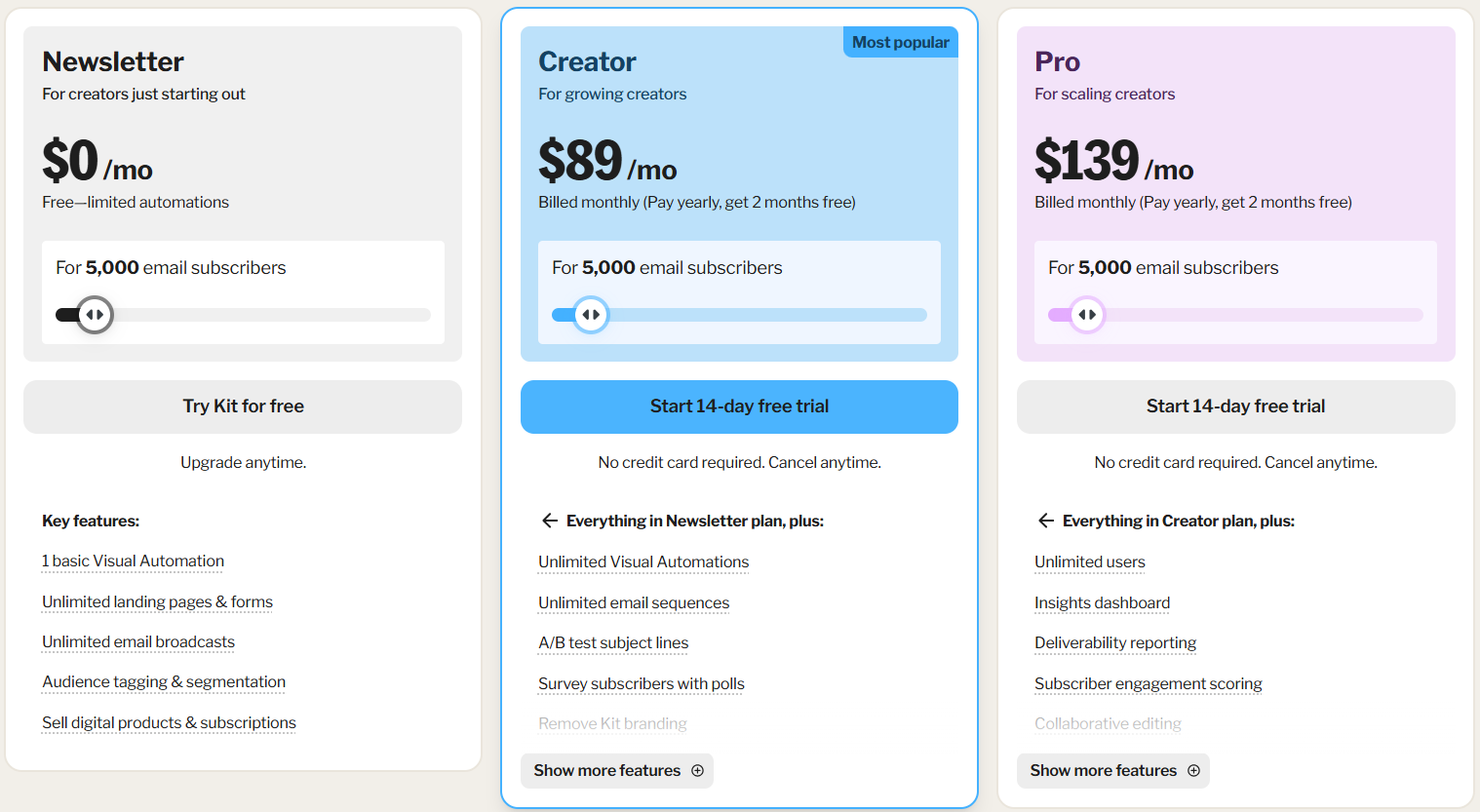
| Paid (5k subs) | $39/month | $89/month |
| Annual discount | ~10% off | 2 months free (~17% off) |
| Automation | Yes (free tier included) | Limited on free, full on paid |
| Landing pages | Yes (free tier) | Yes |
| E-commerce | Basic (up to 1 product free) | ConvertKit Commerce (strong) |
| Creator network | No | Yes |
MailerLite — Best Value for Newsletter Builders
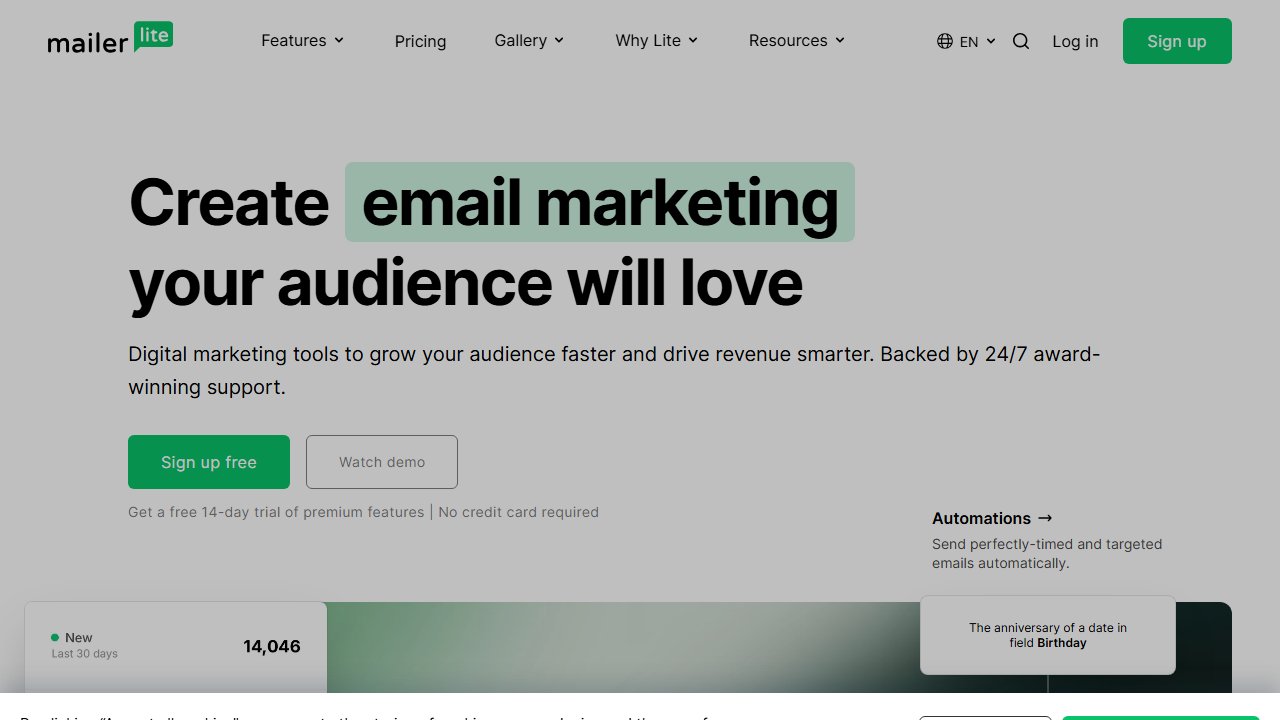
MailerLite’s free plan now supports 500 subscribers with 12,000 emails per month, automation workflows, landing pages, signup forms, and segmentation. Most platforms either cap automation or landing pages on the free tier. MailerLite still includes both — that hasn’t changed.
The interface is one of the cleaner email builder experiences in the category. The drag-and-drop editor works without fighting it, email previews are accurate, and the template library covers most use cases. Navigation is where you’d expect it to be. For someone setting up their first welcome sequence or lead magnet delivery, there’s no learning curve to get past before doing real work.
The workflow builder handles standard sequences well: welcome series, lead magnet delivery, re-engagement campaigns, tag-based segmentation. Nothing exotic, but the common patterns are smooth to set up. The included website builder is simple but functional — useful if you don’t want to manage a separate landing page tool. For a lead capture page, it works. For a full site, you’d want something dedicated.
Embedding forms, triggering pop-ups based on scroll or exit intent, and routing form submissions into specific automations all work without code.
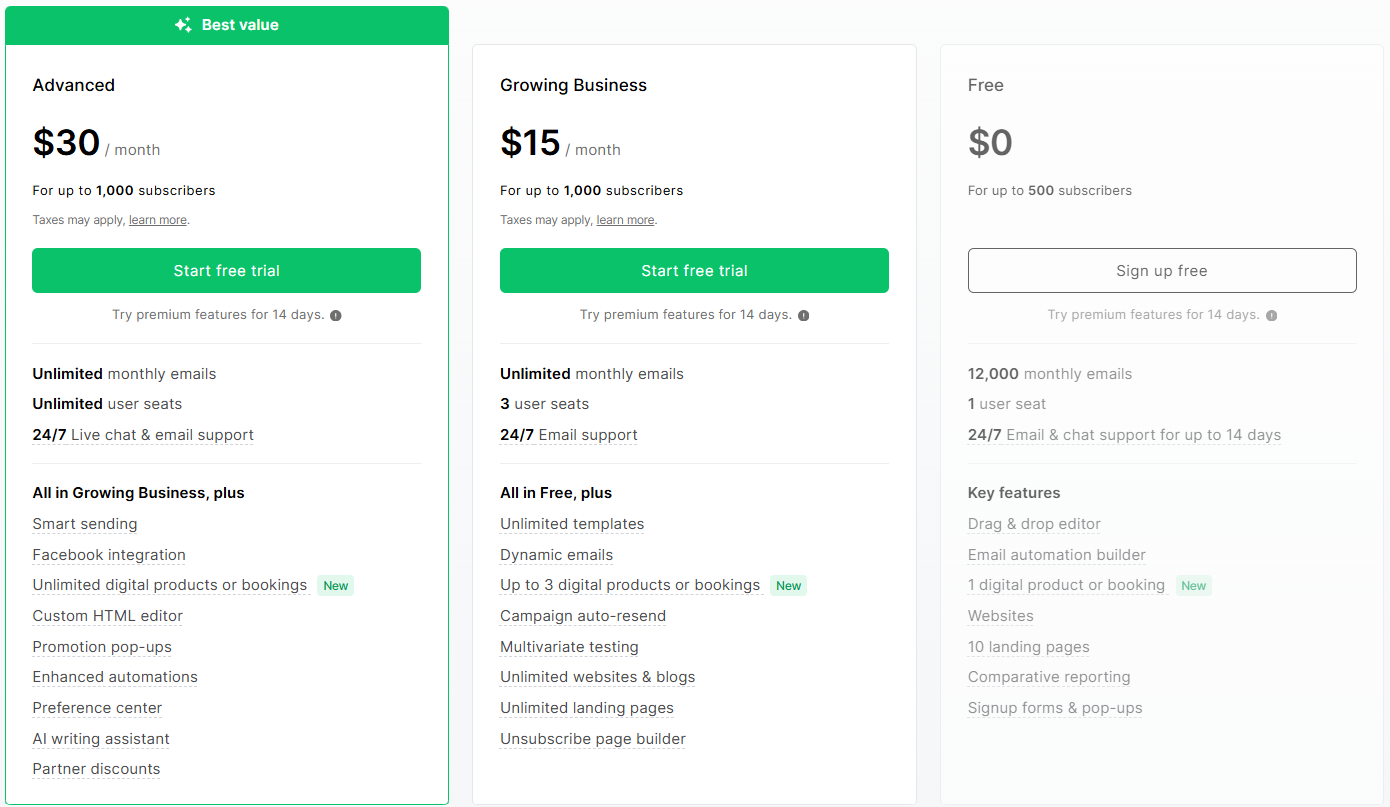
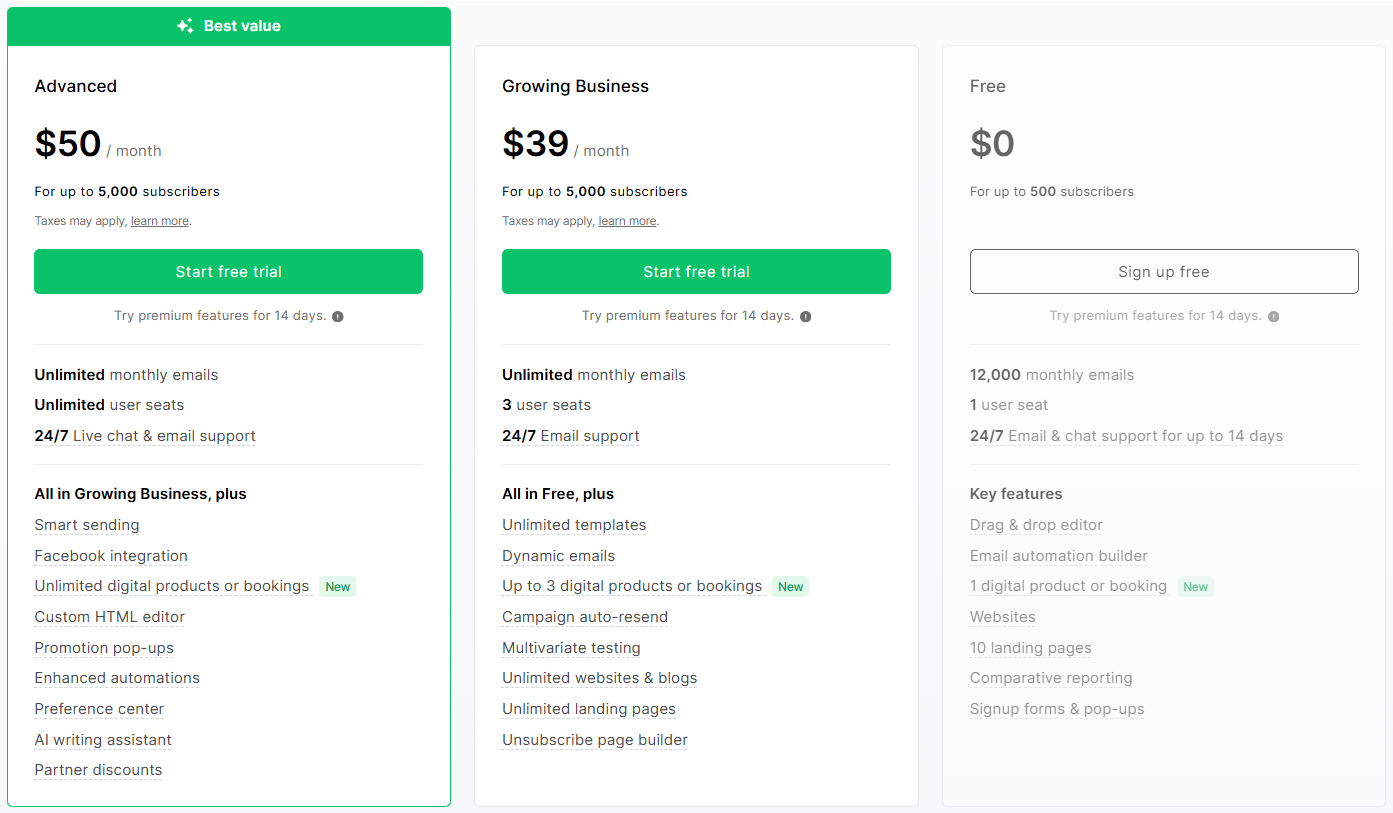
Pricing: Growing Business plan is $15/month at 1,000 subscribers and $39/month at 5,000 — both on monthly billing. Pay annually and you get roughly 10% off. That’s still about 60% cheaper than ConvertKit at equivalent subscriber counts. Try MailerLite free
One thing to be aware of: some users report emails landing in Gmail’s Promotions tab at a higher rate than expected. This isn’t unique to MailerLite — it’s a known pattern across shared-infrastructure email platforms — but it’s a real consideration if open rates matter more than subscriber count to your business model.
Limitation: No creator ecosystem. No sponsorship marketplace, no cross-promotion network, no built-in product commerce. MailerLite is a list-building and nurturing tool. That’s the product.
ConvertKit — Best for Selling Through Email
ConvertKit is built around the idea that your email list is a business asset you sell through. The tagging system, segmentation, and automation workflows are all designed around purchase behavior. The commerce layer handles digital product sales natively, without Gumroad or a separate payment processor. The Creator Network connects you with other creators for cross-promotion and sponsorship.
ConvertKit Commerce lets you sell digital products, courses, and subscriptions directly — the checkout experience is clean and the integration with your email list is native. If you’re selling a $49 ebook or a $197 course, Commerce handles it without adding tools.
Tagging and segmentation are genuinely sophisticated. Tag subscribers based on links clicked, products purchased, forms submitted, and custom events. This matters when you’re sending different offers to different segments and need the targeting to be precise.
The Creator Network is a built-in directory where subscribers can discover new newsletters and creators can cross-promote each other. In practice, the returns vary. A recurring pattern in creator communities is that the network tends to deliver meaningful list growth primarily for accounts with an established audience to begin with — it’s less effective as a cold-start mechanism. The sponsorship marketplace connects creators with brands for paid newsletter deals, but that’s a feature that becomes relevant at meaningful subscriber counts.
Pricing: The Newsletter plan is free up to 10,000 subscribers — significantly more generous than MailerLite’s 500-sub free tier. The catch: it comes with limited automations (one basic visual automation, no sequences). For full automation and sequences you need Creator at $39/month (1,000 subs) or $89/month (5,000 subs) on monthly billing. Pay annually and you get 2 months free. Both paid tiers offer a 14-day free trial, no credit card required.
ConvertKit’s plain-text-first email philosophy also draws consistent complaints. There’s no drag-and-drop builder, no columns, no image galleries. Users who want visually designed emails find the editor limiting — the block-style interface can feel cumbersome for anything beyond a simple text layout. Whether that’s a limitation or a feature depends on your content.
Limitation: The price gap versus MailerLite is significant. At 5,000 subscribers, you’re paying $50/month more for ConvertKit’s Creator plan. If you’re not using Commerce or the Creator Network, that premium is hard to justify.
Head-to-Head on Key Decisions
Building a newsletter from scratch
MailerLite. Lower cost, better free tier for automation, comparable feature set. Start here and migrate if you outgrow it.
Selling digital products via email
ConvertKit. Commerce integration is native and well-built. Worth the price if you’re actively selling.
Automation and sequences
Tie. Both platforms handle standard email sequences, tag-based routing, and behavioral triggers. ConvertKit’s interface is slightly more visual; MailerLite’s is slightly more intuitive.
Growing through cross-promotion
ConvertKit. The Creator Network and sponsorship marketplace don’t have a MailerLite equivalent — though the network works better as a growth accelerator than a growth engine.
Budget under $40/month
MailerLite. Not close. MailerLite’s $15/month Growing Business plan vs ConvertKit Creator’s $39/month minimum is a meaningful difference for early-stage creators. Even ConvertKit’s free Newsletter tier is limited enough that most people end up paying within a few months.
The Migration Question
If you start on MailerLite and later decide ConvertKit is right, the migration is manageable: export your subscribers as CSV, import into ConvertKit, rebuild your automations. The main cost is time rebuilding sequences — usually 2–4 hours for a standard setup.
The practical implication: start where the value is now, not where you might be in three years. MailerLite at 1,000 subscribers costs $15/month. ConvertKit Creator at 1,000 subscribers costs $39/month. If you’re not actively using Commerce or the Creator Network, you’re paying $288/year for a platform premium you’re not extracting.
Our Pick
Starting out, primary goal is list-building and newsletters: MailerLite. The free tier is functional (within the 500-subscriber limit), the paid tiers are priced fairly, and the feature set covers everything most creators need before they’re selling products.
Actively selling digital products or courses: ConvertKit. The native commerce layer and creator ecosystem are worth the price premium if you’re using them.
Both integrate with most tools you’re already using — Notion, project management tools, Zapier, and most course platforms. The choice comes down to your monetization model, not technical integration.
Also see: best free email marketing tools for beginners if you’re earlier in the process.